Insta Pro 2

Insta Pro offers privacy, customization, media features, latest version details, APK download, installation, updates, and FAQs guide.
Security verified
McAfee
F-Secure
Adblock
Insta Pro 2
Insta Pro is a third-party modified Instagram app designed for users who want additional customization, privacy-oriented options, and media-related features beyond the standard Instagram experience. The app is distributed as an APK for compatible Android devices and may include features such as media downloading, multiple account support, themes, dark mode, and additional viewing controls.
If you are looking for Insta Pro APK, this guide explains its main features, system requirements, download and installation process, version information, Insta Pro 2, privacy considerations, and common problems.
What Is Insta Pro?
Insta Pro is a modified version of the Instagram experience that adds features and customization options not necessarily available in the standard application. It is commonly searched for as Insta Pro APK, Insta Pro app, or Insta Pro mod APK.
The exact features can vary between releases, so users should check the version information before installing or updating the application.
Insta Pro vs Instagram
The official Instagram app provides the standard Instagram experience, while Insta Pro focuses on additional customization and third-party features. Depending on the release, Insta Pro may provide options for downloading supported media, changing the interface, managing multiple accounts, and adjusting certain privacy-related settings.
Because Insta Pro is a third-party application, it should not be confused with an official Instagram product.
Insta Pro at a Glance
|
Information |
Details |
|
App name |
Insta Pro |
|
Type |
Third-party modified Instagram app |
|
Common format |
APK |
|
Main platform |
Android |
|
Main purpose |
Enhanced Instagram experience |
|
Features |
Privacy, customization, media and account options |
|
Version availability |
Varies by release |
|
Official Instagram app |
No |
Always check the specific release information before installing because features and compatibility can change between versions.
Insta Pro System Requirements
Before installing Insta Pro, check whether your device can run the particular APK version you intend to use.
Android Compatibility
Insta Pro is primarily distributed for Android devices. The Android version required can differ between releases, so check the requirements associated with your selected version.
Storage Requirements
Keep sufficient free storage available for the APK, installation process, cached files, and normal app operation.
Internet Connection
An internet connection is required for Instagram-related functions such as loading feeds, profiles, messages, stories, and other online content.
Device Compatibility
Compatibility can depend on your Android version, device architecture, available storage, and the specific Insta Pro release.
Why Do Users Choose Insta Pro?
Users who search for Insta Pro are generally interested in additional controls and customization options.
Common reasons include:
- Additional interface customization
- Privacy-oriented controls
- Media-saving functionality
- Multiple account support
- Dark mode and themes
- Additional viewing options
- Different media quality controls
- Extra convenience features
The availability of individual features depends on the release being used.
Insta Pro Features
Insta Pro combines familiar Instagram functionality with additional features that may vary between versions.
Download Photos and Videos
One of the commonly searched features is the ability to save supported Instagram photos and videos. Instead of relying on separate tools, a compatible Insta Pro release may provide download controls within the app.
Download Reels and Stories
Some releases provide options for saving supported Reels and Stories. Availability and behavior can change between versions, so users should check the features of their particular release.
Anonymous Story Viewing
Some versions advertise anonymous or hidden story-viewing options. These features should not be treated as a guarantee of anonymity because behavior can vary by version and Instagram’s own platform changes.
Ad-Free or Reduced-Ad Experience
Some Insta Pro releases include options intended to reduce or remove certain advertisements from the interface. The exact behavior depends on the version.
Multiple Account Support
Users who manage more than one Instagram account may find multiple-account support useful for switching between profiles without repeatedly signing in.
Privacy Controls
Privacy-oriented settings may provide additional control over certain interactions and viewing behavior. Available options vary by release.
Ghost Mode
Ghost Mode is a name used by some modified Instagram applications for privacy-related controls. Depending on the version, it may affect certain activity or viewing indicators.
Bio and Caption Copy
Some versions make it easier to copy text from supported profile biographies, captions, or other areas where standard Instagram may restrict copying.
Direct Chat Shortcut
A direct chat shortcut can provide quicker access to conversations and messaging areas.
Search Function
Insta Pro retains the core idea of Instagram’s search functionality while some releases may add interface or convenience improvements.
Dark Mode
Dark mode changes the visual appearance of the interface and can provide a darker viewing experience.
Multiple Themes and Customization
Customization is one of the main reasons people search for Insta Pro. Depending on the release, users may find themes, interface settings, colors, and other personalization options.
High-Quality Media
Some releases offer additional media-quality controls for viewing or uploading supported content. Actual quality also depends on the original media, device, connection, and Instagram’s processing.
Fast Loading and Performance
Performance can depend on the device, Android version, network connection, and APK release. A lightweight build may work smoothly on compatible hardware, but results can vary.
Data Saver Mode
A data-saving option can be useful for users who want to reduce mobile data consumption while browsing social media.
File Sharing
Some releases provide additional file or media-sharing functionality alongside the standard Instagram features.
Built-in Browser
A built-in browser can provide convenient access to web content without requiring users to leave the application interface.
Zoom Profile Pictures
Some Insta Pro releases include options for viewing profile pictures at a larger size.
Lightweight Application
Some builds are designed with a relatively lightweight interface. Actual storage and memory usage depends on the particular version and device.
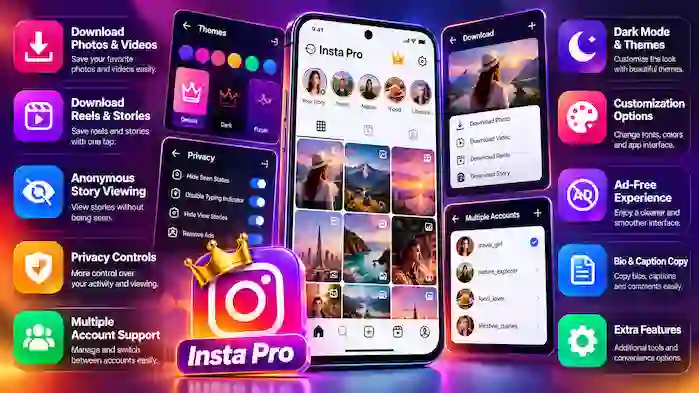
Insta Pro Privacy Features
Privacy is an important reason many users search for modified Instagram applications.
Depending on the version, Insta Pro may include:
- Hidden viewing options
- Ghost Mode
- Additional activity controls
- Privacy-related interface settings
- Options related to read/view indicators
These features should be understood as version-dependent functionality, not as a guarantee that activity is completely invisible.
Insta Pro Customization Options
Insta Pro can appeal to users who want more control over the appearance of their Instagram experience.
Themes
Some versions offer multiple themes or visual styles.
Dark Mode
Dark mode provides a darker interface and can be selected when supported by the release.
Interface Customization
Additional interface controls may allow users to change certain visual elements.
Personalization Options
Depending on the version, users may be able to adjust colors, layouts, and other supported interface settings.
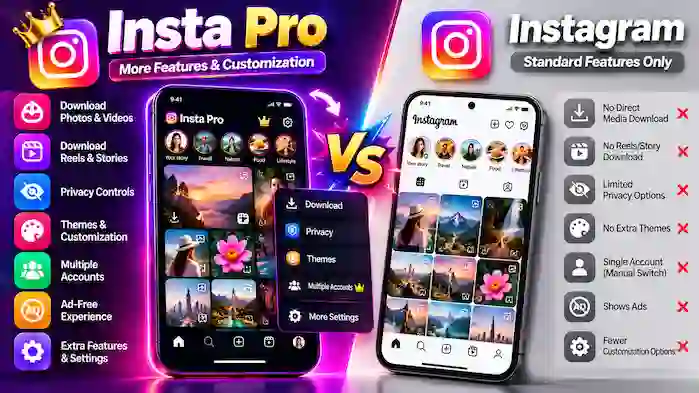
Insta Pro vs Official Instagram
|
Feature |
Insta Pro |
Official Instagram |
|
Core Instagram functionality |
Yes |
Yes |
|
APK distribution |
Common |
Official app distribution |
|
Extra customization |
Version dependent |
More limited |
|
Media-saving features |
Version dependent |
Official functionality varies |
|
Privacy-related modifications |
Version dependent |
Standard controls |
|
Multiple accounts |
Supported in compatible releases |
Supported |
|
Third-party application |
Yes |
No |
The main distinction is that Insta Pro is a third-party modified application, while Instagram is the official service and application.
Insta Pro vs Insta Pro 2
The insta Pro 2 is another version or variant users may encounter when searching for modified Instagram applications.
Insta Pro
The standard Insta Pro release may provide features such as customization, media downloading, privacy-related controls, and multiple account support.
Insta Pro 2
Insta Pro 2 may offer a different feature set, interface, or compatibility depending on its release.
Which Version Should You Choose?
The right choice depends on your device compatibility and the features available in the specific release. Rather than choosing solely by version number, check the release information, requirements, and features before installing.
Insta Pro Latest Version
The Insta Pro latest version can change as new releases become available. A version number should therefore be checked against the specific release you are considering rather than assumed to be current.
What’s New in the Latest Version?
A new release may include:
- Bug fixes
- Compatibility improvements
- Performance changes
- Interface changes
- Feature updates
- Security or stability improvements
Why Keep Insta Pro Updated?
Updating can help maintain compatibility with newer Android versions and address problems found in earlier releases. However, users who depend on a particular feature should check the new release before updating.
Insta Pro APK Download
If you are searching for Insta Pro APK download, first identify the version you need and check its compatibility with your Android device.
Before downloading an APK, consider:
- APK version
- Android compatibility
- File size
- Source reputation
- Required permissions
- Whether you need the latest or an older version
A dedicated download page can provide more detailed version and installation information.
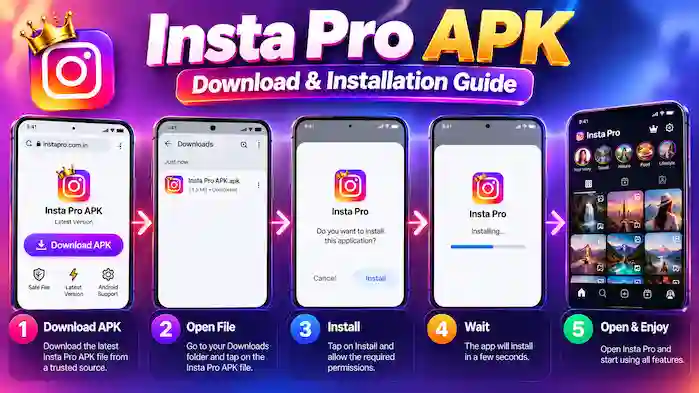
How to Install Insta Pro APK
Installing an APK is different from installing an application through an official app store.
Step 1: Download the APK
Obtain the appropriate Insta Pro APK for your compatible Android version.
Step 2: Check Device Compatibility
Review the Android requirements and available storage before starting the installation.
Step 3: Start Installation
Open the downloaded APK and follow the Android installation prompts.
Step 4: Open Insta Pro
After installation, launch the application and review its initial settings.
Step 5: Log In
If you choose to use an Instagram account with the application, enter your account credentials through the app’s available login interface.
How to Install an Older Insta Pro Version
If you need an older release for compatibility reasons, first confirm that the version is appropriate for your device. Installing an older APK can sometimes create compatibility or update issues.
How to Use Insta Pro
After installation, the basic workflow is similar to using a social-media application.
Setting Up Insta Pro
Open the application and review its available settings before using the main interface.
Logging Into Your Account
Use the login interface if you decide to connect an Instagram account.
Navigating the Interface
Explore the home feed, profile, search, messaging, and settings sections.
Using Privacy Features
Review the available privacy controls and understand what each option changes before enabling it.
Downloading Supported Media
When a supported download feature is available, use the relevant control provided by the application.
Managing Multiple Accounts
If your release supports multiple accounts, use the account management or switching option to move between profiles.
Customizing the Interface
Check themes, dark mode, colors, and other available personalization settings.
Insta Pro Login
The login process is generally similar to signing into other Instagram-based applications, but third-party applications can behave differently after platform changes.
How to Log In
Open Insta Pro, select the login option, and enter the requested account information.
What You Need Before Logging In
Make sure your credentials are correct and your device has a stable internet connection.
Common Login Problems
Login problems can result from:
- Incorrect credentials
- Connectivity problems
- App compatibility issues
- Version-related problems
- Changes to Instagram’s authentication systems
What to Do If Insta Pro Won’t Log In
Check your connection, confirm your credentials, make sure the app version is compatible, and consider whether the issue started after an update.
Insta Pro Update
Keeping an application updated can help address bugs and compatibility problems.
How to Update Insta Pro
Check the version you currently have, compare it with the intended release, and install the appropriate updated APK when necessary.
Update vs Fresh Installation
An update may preserve existing application data depending on the installation method and Android behavior, while a fresh installation can require additional setup.
Common Update Problems
Users may encounter:
- Installation conflicts
- Compatibility errors
- Missing features
- App crashes
- Login issues after updating
How to Check Your Current Version
The installed version is generally shown in the application’s settings or app information area, depending on the release.
Insta Pro Old Version
Some users search for an Insta Pro old version because a newer release may not work well with their device or may change a feature they previously used.
Why Use an Older Version?
Possible reasons include:
- Device compatibility
- Familiar interface
- Feature availability
- Performance on older hardware
Old Version vs Latest Version
Older releases may provide compatibility advantages but can lack newer fixes and improvements. Newer releases may provide better compatibility with current systems but can change features or behavior.
Compatibility Considerations
Before installing an older APK, verify its Android requirements and compatibility with your device.
Insta Pro 2
Insta Pro 2 is another search term commonly associated with modified Instagram applications.
What Is Insta Pro 2?
Insta Pro 2 refers to a separate version or variant that users may encounter when searching for Insta Pro downloads.
Insta Pro 2 Features
Depending on the release, features can include:
- Media downloading
- Customization
- Privacy-related controls
- Multiple accounts
- Dark mode
- Additional interface options
Insta Pro 2 APK
The APK version should be selected according to your device’s compatibility requirements.
How to Download Insta Pro 2
Check the version information first, then obtain the appropriate APK and follow the installation instructions for your device.
How to Install Insta Pro 2
Download the compatible APK, start the installation process, and complete the Android setup prompts.
How to Update Insta Pro 2
Check the currently installed version and compare it with the intended release before updating.
Insta Pro 2 Version Information
Searches for Insta Pro 2 often include specific version numbers and older releases.
Insta Pro 2 Latest Version
The latest release should be verified before publishing or downloading because version information can change.
Insta Pro 2 Version 13.65
If you are specifically searching for Insta Pro 2 13.65 APK, treat 13.65 as a version-specific release rather than automatically calling it the newest version.
Older Insta Pro 2 Versions
Older releases may be useful for compatibility, but they can have outdated features or limitations.
Is Insta Pro Safe to Use?
Insta Pro should be considered a third-party modified application, not an official Instagram product.
Is Insta Pro an Official Instagram App?
No. Insta Pro is separate from the official Instagram application.
Understanding Third-Party APKs
Installing a third-party APK means you are using software outside the normal official distribution channel. This makes it important to consider the source, permissions, version, and privacy implications.
Privacy Considerations
Review the permissions requested by the application and avoid providing unnecessary information.
Account and Login Considerations
Using a third-party application with an Instagram account can involve additional account and privacy considerations. Users should understand these factors before entering account credentials.
How to Reduce Security Risks
Use reputable sources, verify the APK version, review permissions, keep your device protected, and avoid suspicious files or modified packages from unknown sources.
Insta Pro Pros and Cons
Pros
- Additional customization options
- Privacy-oriented features
- Media-related functionality
- Multiple-account support
- Themes and dark mode
- Additional interface controls
Cons
- Third-party application
- Features vary between versions
- Compatibility may differ between devices
- Updates may introduce changes
- Privacy and account considerations require attention
Common Insta Pro Problems & Solutions
Insta Pro Won’t Install
Check Android compatibility, available storage, and whether another version of the application is already installed.
Insta Pro Won’t Open
Restart the device, check compatibility, and consider whether the installed version is suitable for your Android version.
Insta Pro Login Not Working
Check your credentials and internet connection and consider whether the problem started after an application update.
Insta Pro Download Feature Not Working
The feature may depend on the particular release or the type of content being downloaded. Check whether the feature is supported in your version.
Insta Pro Update Failed
Installation conflicts, incompatible versions, or insufficient storage can cause update problems.
App Crashes or Freezes
Check available storage, restart the device, and consider whether the installed release is compatible with your hardware and Android version.
Features Missing After an Update
Feature availability can change between releases. Review the version information before assuming that a feature has been permanently removed.
Compatibility Problems
If a release does not work correctly, verify the Android version and device requirements associated with that particular APK.
Insta Pro for PC
Insta Pro is primarily associated with Android APK releases. Running an Android APK on a PC generally requires an Android-compatible environment such as an emulator.
Can Insta Pro Run on PC?
It may be possible to run a compatible Android APK through an Android emulator, but this is different from having a native Windows or macOS version.
Android Emulator Considerations
Performance depends on the emulator, computer hardware, Android environment, and APK compatibility.
Compatibility Limitations
Not every APK works correctly in every emulator, so users should check compatibility before relying on a PC setup.
Frequently Asked Questions
What is Insta Pro?
Insta Pro is a third-party modified Instagram application that may provide additional customization, privacy-related and media features.
Is Insta Pro free?
Availability and distribution can vary by release. Check the specific version and source for current information.
Is Insta Pro an official Instagram app?
No. Insta Pro is a third-party application and is separate from the official Instagram app.
What is the difference between Insta Pro and Instagram?
Insta Pro may offer additional customization and third-party features, while Instagram is the official application and service.
Can I download photos and videos with Insta Pro?
Some releases provide media-download functionality for supported content.
Can Insta Pro download Reels and Stories?
Some versions support downloading certain Reels or Stories. Feature availability can vary by release.
Can I use multiple accounts on Insta Pro?
Multiple-account support may be available depending on the version.
Can I install Insta Pro on PC?
An Android APK may be usable through a compatible Android emulator, but this does not mean Insta Pro has a native PC application.
What is Insta Pro 2?
Insta Pro 2 is a separate version or variant associated with the Insta Pro modified Instagram ecosystem.
How do I update Insta Pro?
Check your installed version, verify the intended release, and install the compatible updated APK.
Can I use an older Insta Pro version?
Older releases may be used when compatible, particularly when users need a specific feature or device compatibility.
Why isn’t Insta Pro installing?
Common causes include incompatible Android versions, insufficient storage, installation conflicts, or an unsuitable APK release.
Why can’t I log in to Insta Pro?
Login issues can be caused by incorrect credentials, connection problems, compatibility issues, or changes affecting third-party applications.
Conclusion
Insta Pro provides an alternative Instagram experience with additional customization, privacy-oriented controls, media features, themes, multiple-account support, and other options that can vary between releases. The Insta Pro APK should be selected according to your device compatibility and the features you actually need.
Before downloading or updating, check the version information, installation requirements, permissions, and third-party nature of the application. If you are considering Insta Pro 2, an older version, or a newer release, compare the available features and compatibility rather than relying only on the version number.
For the best experience, keep your chosen release compatible with your device and use careful judgment when working with third-party APK files.